Stop Lag: How to Implement Object Pooling in Godot 4
Learn how to implement object pooling in godot 4 to eliminate frame drops and boost FPS by efficiently reusing nodes in your game.

When building games with heavy object counts—like bullet hells, high-rate-of-fire shooters, custom particle systems, or debris spawners—frequent allocation and destruction of objects in your graphics engine quickly becomes the main bottleneck in your render pipeline. If you have ever noticed micro-stuttering right as your character unleashes a bullet barrage, your GPU isn't to blame—it's the memory manager under heavy stress. Knowing how to implement object pooling in godot 4 is the difference between frustrating frame drops and a buttery-smooth 60 or 144 FPS experience.
In this guide, we will break down how instance recycling works in Godot 4.7.2, examine the hidden performance cost of methods like instantiate() and queue_free(), and build a robust, reusable manager class in GDScript to give your project professional-grade performance.
Why Continuous Node Allocation Destroys Performance in Godot 4
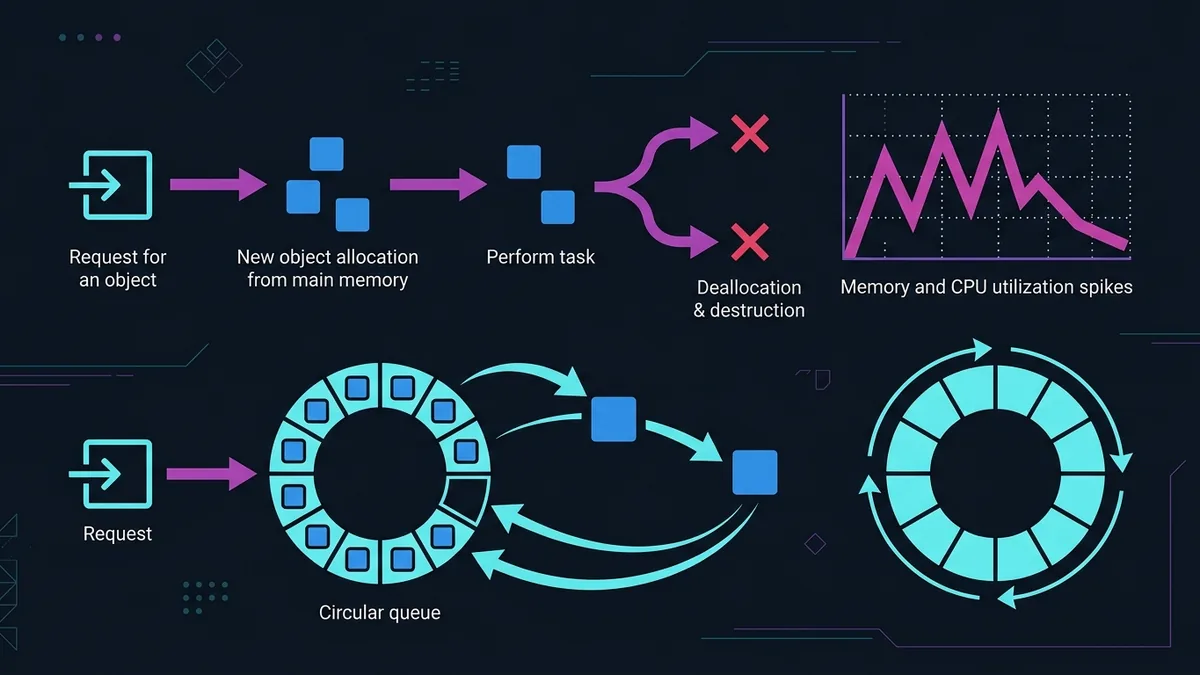
Every time you call instantiate() on a preloaded scene (PackedScene), Godot allocates C++ memory under the hood, builds the node hierarchy along with its properties, initializes attached GDScript files, and inserts the node into the SceneTree. Once that object finishes its job—say, a bullet hitting a wall—calling queue_free() flags it for deletion at the end of the current frame. This triggers memory deallocation and forces the engine's reference-counting system to clean up underlying structures.
At scale (spawning ten enemies across a level), this overhead is negligible. However, when you spawn and destroy fifty projectiles a second, that constant churn creates two major software engineering bottlenecks:
- Heavy Memory Fragmentation: Rapidly allocating and freeing blocks of memory forces the OS and engine memory managers to burn CPU cycles searching for contiguous free spaces.
- Reference Counting & Garbage Collector Overhead: Godot manages objects using a hybrid approach of reference counting (
RefCounted) and manual/automatic lifecycle management forNodesubclasses. Accumulating dozens of pending frees at the end of busy frames leads to noticeable frametime spikes.
Object Pooling solves this by eliminating runtime node destruction and instantiation altogether. Instead of freeing a node with queue_free(), we simply hide it, disable its physics and collision processing, and push it into a waiting queue. When a new object of that type is requested, we pop an existing instance from the queue, reset its position and state, and drop it back into action. Zero runtime memory allocations, zero stutter.
Step-by-Step: How to Implement Object Pooling in Godot 4
To keep our pooling system clean, modular, and easy to drop into any Godot 4.7.2 project, we will create a self-contained node called ObjectPool. It manages the lifecycle of a specific scene, allowing any spawner to request a ready instance without needing to know how it was created.
Here is the complete GDScript implementation, utilizing strict static typing to ensure peak execution performance in the Godot Virtual Machine:
class_name ObjectPool
extends Node

@export var scene_to_pool: PackedScene
@export var initial_pool_size: int = 50
@export var can_grow: bool = true

var _available_objects: Array[Node] = []
var _active_objects: Array[Node] = []

func _ready() -> void:
    if not scene_to_pool:
        push_error("ObjectPool: No scene assigned to pool in " + name)
        return

    _preallocate_pool()

func _preallocate_pool() -> void:
    for i in range(initial_pool_size):
        var obj: Node = _create_new_instance()
        _disable_object(obj)
        _available_objects.append(obj)

func _create_new_instance() -> Node:
    var obj: Node = scene_to_pool.instantiate()
    add_child(obj)
    if obj.has_signal("returned_to_pool"):
        obj.connect("returned_to_pool", Callable(this, "_on_object_returned"))
    return obj

func spawn(global_pos: Vector2, rotation_angle: float = 0.0) -> Node:
    var obj: Node = null

    if _available_objects.is_empty():
        if can_grow:
            obj = _create_new_instance()
        else:
            push_warning("ObjectPool: Pool size limit reached without expansion permission!")
            return null
    else:
        obj = _available_objects.pop_back()

    _active_objects.append(obj)
    _enable_object(obj, global_pos, rotation_angle)
    return obj

func release(obj: Node) -> void:
    if obj in _active_objects:
        _active_objects.erase(obj)
        _disable_object(obj)
        _available_objects.append(obj)

func _enable_object(obj: Node, global_pos: Vector2, rotation_angle: float) -> void:
    if obj is Node2D:
        var node_2d: Node2D = obj as Node2D
        node_2d.global_position = global_pos
        node_2d.rotation = rotation_angle
        node_2d.visible = true

    obj.set_process(true)
    obj.set_physics_process(true)

    if obj.has_method("on_spawn"):
        obj.call("on_spawn")

func _disable_object(obj: Node) -> void:
    if obj is Node2D:
        var node_2d: Node2D = obj as Node2D
        node_2d.visible = false

    obj.set_process(false)
    obj.set_physics_process(false)

    if obj.has_method("on_despawn"):
        obj.call("on_despawn")

func _on_object_returned(obj: Node) -> void:
    release(obj)
The primary advantage of this approach is predictability. During level load (_ready()), the script executes _preallocate_pool() and allocates all required nodes up front. Spawning or recycling a projectile during gameplay simply moves object references between two arrays and toggles processing flags on the scene tree.
How to Manage the Lifecycle of Recycled Objects
A common mistake when implementing node recycling is forgetting to reset the object's internal state. Because the node is never truly destroyed, residual state from previous spawns can trigger visual bugs or broken game logic.
To make sure a recycled node behaves identically to a freshly instanced one, define a clean lifecycle contract inside the object's script (for example, a cannon bullet):
extends Area2D

signal returned_to_pool(obj: Node)

@export var speed: float = 800.0
@export var lifetime: float = 2.0

var _travelled_time: float = 0.0

func _physics_process(delta: float) -> void:
    position += transform.x * speed * delta
    _travelled_time += delta

    if _travelled_time >= lifetime:
        _recycle()

func on_spawn() -> void:
    _travelled_time = 0.0
    $CollisionShape2D.disabled = false
    $GPUParticles2D.emitting = true

func on_despawn() -> void:
    $CollisionShape2D.disabled = true
    $GPUParticles2D.emitting = false

func _recycle() -> void:
    returned_to_pool.emit(self)

func _on_body_entered(_body: Node2D) -> void:
    _recycle()
Centralizing activation logic in on_spawn() and cleanup logic in on_despawn() covers the critical aspects of object reuse:
- Collisions: Disabling
CollisionShape2Dprevents inactive pool objects from registering phantom collisions while hidden. - Particle Systems: Setting
emitting = falseensures legacy particle trails cut off immediately rather than snapping across the screen when respawned. - Timers & Counters: Resetting
_travelled_timeprevents the object from immediately despawning upon being fetched from the pool.
Here is how traditional direct allocation compares against Object Pooling under heavy loads:
| Performance Metric | Traditional Allocation (instantiate/queue_free) |
Object Pool Approach | Gameplay Impact |
|---|---|---|---|
| Frame Time | Sporadic spikes above 16.6ms | Smooth, predictable baseline | Eliminates micro-stuttering and visual hitches |
| Memory Pressure (RAM/VRAM) | Constant thrashing from allocs/deallocs | Fixed pre-allocated memory | Prevents OS-level memory fragmentation |
| Spawn CPU Usage | High (GDScript Parser + C++ Constructor) | Minimal (Array lookups + setters) | Allows spawning hundreds of objects per frame |
| Code Complexity | Low (two lines per object) | Medium (requires manager class) | Trades minor setup overhead for high performance |
What Pitfalls to Avoid When Reusing Nodes in Godot 4.7.2?

While object pooling delivers massive frame rate gains, incorrect implementation can introduce subtle memory leaks or bizarre physics behavior. Keep an eye out for these three common traps:
1. Forgetting to Disconnect Dynamically Connected Signals
If your object listens to signals from other game nodes (like a player's health_changed signal or a global event timer), remember to disconnect them during on_despawn(). If an inactive projectile remains connected to a signal, event handlers will keep running in the background, wasting CPU cycles and potentially throwing errors against missing node trees.
2. Failing to Disable Physics Processing
Hiding a node with visible = false does not stop Godot from processing its movement and collision logic. You must call set_physics_process(false) and disable collision shapes. Otherwise, the engine continues running physics calculations for invisible nodes in the 2D or 3D physics server.
3. Letting the Pool Grow Unchecked
Setting can_grow = true is useful for emergency overhead, but if your pool grows from 50 to 5,000 objects and never shrinks back down, you end up holding onto substantial memory for objects that were only needed during a single peak action sequence. For games with extreme spikes, consider adding a periodic pool shrinking routine that frees excess idle instances over time.
Conclusion
Mastering how to implement object pooling in godot 4 is an essential step for any developer aiming to ship smooth, polished, and well-optimized games. By replacing the costly cycle of continuous allocations with a pre-allocated reusable queue, you free the render pipeline from unnecessary hitches and maintain rock-solid frame rates under heavy processing load. Integrate this architecture into your projectile, explosion, and visual effect systems in Godot 4.7.2, and enjoy immediate improvements in gameplay responsiveness.