How to Run a Python MCP Server in Production?
Learn how to build a secure python mcp server using FastMCP to connect LLMs to databases and APIs safely in production environments.

Connecting language models to external tools used to require writing custom connectors and rigid Lambda functions for every new API. In 2026, the widespread adoption of the Model Context Protocol (MCP) transformed this landscape by creating an open standard for communication between AI clients and legacy systems. If you need to expose databases, code execution, or internal services to AI assistants, building a python mcp server is the most sustainable and scalable approach available in the modern software ecosystem.
In this practical guide, you will learn how to structure a FastMCP-based application running on Python 3.14.7. We will cover everything from protocol fundamentals to asynchronous concurrency support, strict schema validation, and production deployment patterns using streamable HTTP transports.
What Is the Model Context Protocol and Why Does It Matter?
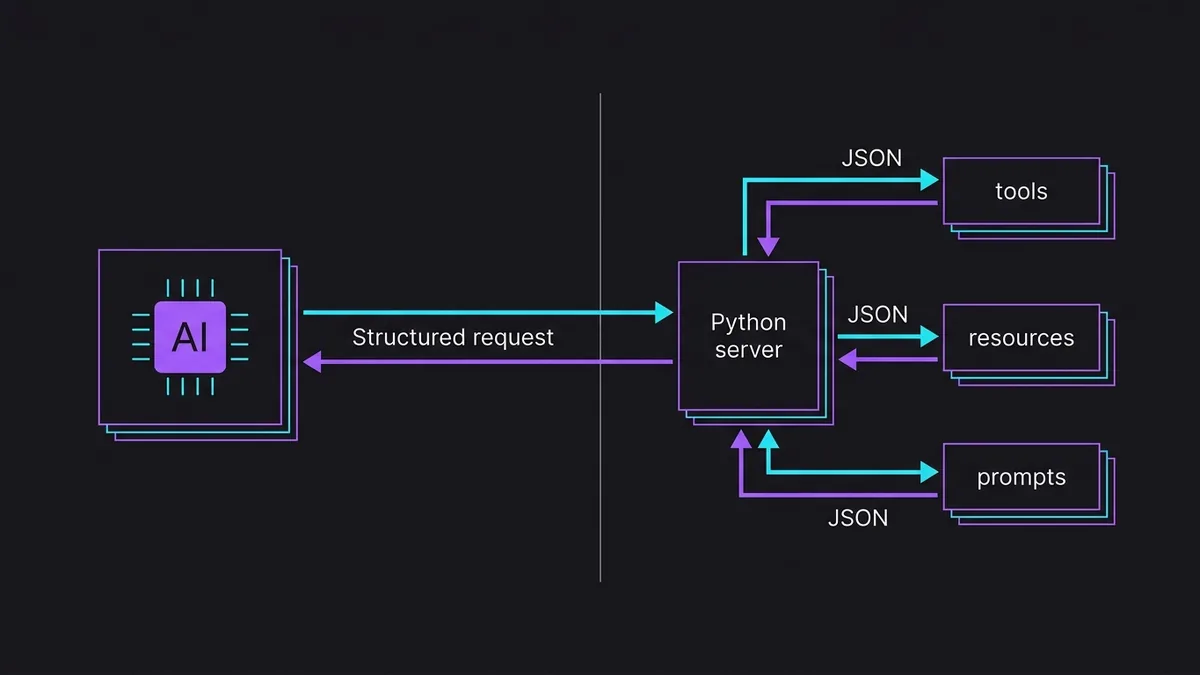
The Model Context Protocol is an open specification based on JSON-RPC 2.0 that defines how a client (such as a dev environment or an autonomous agent) discovers and invokes resources provided by a server. Prior to this standardization, every AI framework required a different tool-calling specification, forcing developers to rewrite wrappers for the exact same API repeatedly.
In the MCP architecture model, components are divided into three primary primitives:
- Tools: Executable functions that perform operations with side effects or complex calculations, receiving validated arguments and returning structured responses to the model.
- Resources: URI-oriented endpoints for reading passive data, such as system logs, PostgreSQL 18.6 tables, or configuration files.
- Prompts: Reusable context templates that guide AI behavior using dynamic user-defined parameters.
By leveraging Python 3.14.7 to expose these primitives, we take advantage of native type checking and modern runtime performance, enabling us to build servers with low overhead and full maintainability.
How to Structure and Implement a Python MCP Server?
The most productive way to build a python mcp server is by using FastMCP, the standard ecosystem library that abstracts the JSON-RPC serialization layer and provides intuitive decorators.
To get started, create a clean virtual environment and install the required dependencies:
python3.14 -m venv .venv
source .venv/bin/activate
pip install fastmcp pydantic httpx
Below is the complete implementation of a working server that exposes a simulated weather query tool and a dynamic system monitoring resource:
import asyncio
import os
from typing import Annotated
from pydantic import Field
from fastmcp import FastMCP

mcp = FastMCP(
    name="InfraMonitor",
    instructions="MCP server for inspecting infrastructure metrics and services."
)

@mcp.tool()
async def consultar_status_servico(
    servico: Annotated[str, Field(description="Name of the internal service, e.g., auth-api, database")]
) -> dict[str, str]:
    """Checks the operational status of an enterprise service by name."""
    servicos_validos = {"auth-api": "operacional", "database": "operacional", "cache": "degradado"}
    status = servicos_validos.get(servico.lower(), "desconhecido")
    return {"servico": servico, "status": status, "latencia_ms": "12"}

@mcp.resource("system://metrics/{host}")
def obter_metricas_host(host: str) -> str:
    """Returns simulated CPU and memory usage readings for a specific host."""
    return f"Host: {host} | CPU: 24% | RAM: 4.2GB / 16GB | Load: 0.85"

@mcp.prompt()
def instrucao_diagnostico(servico: str) -> str:
    """Generates a pre-formatted prompt to investigate service failures."""
    return f"Analise o estado do serviço '{servico}'. Verifique ferramentas de status e leia as métricas do host associado antes de sugerir um plano de ação."

if __name__ == "__main__":
    mcp.run(transport="stdio")
In this code, FastMCP inspects function type hints and docstrings. This metadata is automatically converted into JSON Schema specs sent to the client during the protocol handshake.
Strict Validation and Typing with Pydantic
When a language model decides to invoke a tool, the payload generated by the LLM does not always strictly follow expectations. FastMCP integrates with Pydantic to enforce runtime input validation. If the client sends an incompatible type, the protocol returns a clear RPC error before your server-side function ever runs.
from pydantic import BaseModel, Field, EmailStr

class PayloadCriacaoUsuario(BaseModel):
    nome: str = Field(..., min_length=3, description="Full name of the new operator")
    email: EmailStr = Field(..., description="Valid corporate email address")
    nivel_acesso: int = Field(default=1, ge=1, le=5, description="Permission level between 1 and 5")

@mcp.tool()
def registrar_operador(dados: PayloadCriacaoUsuario) -> str:
    """Registers a new operator in the system with strict contract validation."""
    return f"Usuário {dados.nome} ({dados.email}) cadastrado com nível {dados.nivel_acesso}."
How to Configure stdio and Streamable HTTP Transports in Production?
The MCP protocol supports multiple transport mechanisms. Choosing the right transport depends on where your client and server are deployed.
Stdio Mode
In stdio mode, the client spawns the server as a local subprocess and communicates via standard input and output (stdin/stdout) using JSON-RPC messages. This model is ideal for tools running on the same machine as the development environment (like IDE plugins or local CLI tools). There is no network overhead or HTTP authentication required, but execution is constrained to the local host.
Streamable HTTP Mode
In distributed production environments, centralizing tools on a remote server requires networking. The streamable-http transport relies on HTTP connections with Server-Sent Events (SSE) support to maintain real-time bidirectional communication.
Here is a quick comparison between both transport models:
| Feature | Stdio Transport | Streamable HTTP Transport |
|---|---|---|
| Primary Use Case | Local developer tools | Production microservices cluster |
| Isolation | Child process on host OS | Isolated container / Cloud |
| Authentication | Host OS file/process permissions | JWT Tokens, mTLS, API Headers |
| Scalability | Bound to single host machine | Horizontal via Load Balancers |
| Complexity | Zero (plug-and-play) | Requires reverse proxy & network config |
To switch your server to production HTTP mode, update the entry point:
if __name__ == "__main__":
    mcp.run(
        transport="streamable-http",
        host="0.0.0.0",
        port=8000
    )
In an enterprise setup, this service should run behind a reverse proxy like Nginx or Traefik hosted on Debian 13.7 or Ubuntu 26.04.1, handling TLS termination and access control policies.
How to Test and Debug MCP Tools Locally?
Testing a server interactively with live LLMs can burn through API tokens quickly and make edge cases hard to reproduce. The best way to validate your code's behavior is using the ecosystem's official inspection tool, the MCP Inspector.
Launch the inspector straight from the FastMCP CLI by pointing to your entry file:
fastmcp dev server.py
This command spins up a local web UI where you can:
- Inspect all registered tools and their generated JSON Schemas.
- Trigger manual tool calls by filling out form inputs in the browser.
- View raw JSON-RPC logs sent back and forth in real time.
- Simulate network dropouts or invalid responses from the server.
Additionally, make sure to write standard unit tests using pytest to prevent regressions without depending on the network layer.
What Are the Best Practices for Exposing Sensitive APIs via MCP?

Exposing code execution capabilities and direct database access to autonomous AI agents introduces security risks that must be guarded at the application layer. Agents subject to indirect prompt injection might attempt destructive calls if tools fail to enforce hard boundaries.
1. Principle of Least Privilege
Never use root or superuser credentials inside your MCP connectors. If a tool only needs to read records from a PostgreSQL 18.6 table, provision a restricted database user with exclusive SELECT permissions on required columns only. The MCP server process should never have privileges to drop tables or modify schemas.
2. Strict Argument Sanitization
Even with Pydantic validation, take extra care when passing user arguments into system shell execution or dynamic SQL queries. Always use parameterized queries (prepared statements) and avoid raw string formatting or string concatenation.
# Safe approach for executing restricted commands
import subprocess

@mcp.tool()
def checar_ping_host(host: str) -> str:
    """Pings a specific host using sanitized arguments."""
    # Prevents command injection by ensuring the host contains no special characters
    if not host.isalnum() and not host.replace(".", "").isalnum():
        raise ValueError("Nome de host inválido.")

    resultado = subprocess.run(
        ["ping", "-c", "2", host],
        capture_output=True,
        text=True,
        timeout=5
    )
    return resultado.stdout
3. Rate Limiting and Concurrency Limits
Because AI agents can occasionally get stuck in reasoning loops and fire off dozens of calls per second, implement client rate-limiting mechanisms using asynchronous Python middleware.
Conclusion
Mastering how to build a python mcp server is a critical skill for software engineers designing AI systems in 2026. The standardization introduced by MCP removes tight coupling with specific agent frameworks, enabling your APIs and legacy systems to be safely consumed by any modern AI client.
By leveraging FastMCP's declarative syntax, Pydantic runtime checks, and scalable network transports, you can elevate local Python functions into robust, production-ready AI tools. Start migrating your automation scripts into MCP connectors today to upgrade your system architecture.