The Secret to Moving 1,000 Units with a Godot 4 Flow Field
Learn how to build a godot 4 flow field system to move thousands of swarm entities without dropping FPS. Complete step-by-step GDScript tutorial.

When trying to navigate hundreds of units simultaneously in a real-time strategy or arena survivor game, most developers instinctively instantiate multiple navigation nodes and calculate individual paths. The problem is that standard A algorithms in traditional pathfinding scale terribly when dozens or hundreds of agents try to recalculate their paths to the same destination every frame. If you have ever hit brutal frame drops when increasing enemy counts chasing the player, implementing a godot 4 flow field* is the ultimate solution to maintain a locked 60 FPS even with thousands of entities on screen.
Unlike agent-based pathfinding where each unit computes its own node graph, a flow field flips this processing logic. The entire navigation map is converted into a two-dimensional grid of direction vectors calculated once per frame for a given target. Every unit on the map simply reads the vector of the cell it is standing on and applies a movement force in that direction. Computational cost stops scaling with the number of on-screen units and depends solely on the map grid size. In this article, we will build a complete implementation from scratch in Godot 4.7.2, covering everything from cost matrix construction to runtime optimization.
Why does traditional A* fail with hundreds of units?
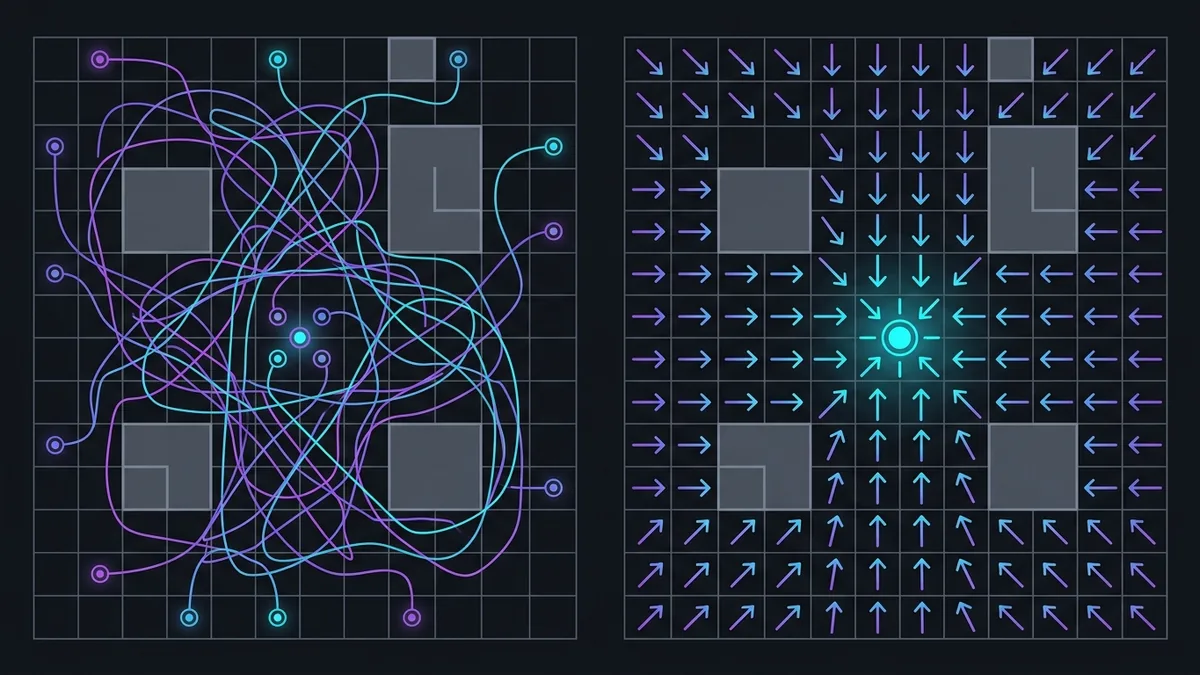
To understand why vector fields are necessary, it helps to analyze the asymptotic complexity of the A (A-Star) algorithm. When a hundred agents search for a path across a map using A, the CPU must execute a hundred individual searches across navigation graphs. Each search requires expensive priority queue insertions and deletions, open/closed list checks, and iterative distance calculations using Manhattan or Euclidean heuristics.
When two or three units collide or hit a dynamic obstacle, their previous paths become invalid, triggering a recalculation request. In a swarm scenario with 2,000 units moving toward the player, that means 2,000 pathfinding calls per second — or per frame if the player position constantly shifts. The bottleneck is not GPU rendering capacity, but CPU main thread exhaustion from iterating over thousands of individual routes simultaneously.
The table below compares the computational behavior of individual A* versus a flow field system as project scale increases:
| Comparison Metric | Traditional A* Pathfinding | Flow Field Optimization |
|---|---|---|
| Per-Agent Complexity | O(N * K) where N is the agent count | O(1) per additional agent |
| Grid Complexity | Depends on individual route length | O(M) where M is total grid cells |
| CPU usage with 100 units | Low (1 to 3 ms per frame) | Barely noticeable (< 0.5 ms per frame) |
| CPU usage with 2,500 units | Critical (severe frame drops) | Stable (constant grid calculation time) |
| Moving target adaptation | Requires recalculating N full paths | Requires updating the grid once |
This massive gap in scalability is why classic large-scale RTS games and modern horde survival titles rely on vector maps. The individual unit ceases to be an expensive autonomous agent and becomes a passive particle guided by terrain vectors.
How do you build a godot 4 flow field to move massive hordes?
To get a godot 4 flow field running in Godot 4.7.2, we need to divide the system architecture into three core sequential steps: the Cost Field, the Integration Field, and the Flow Field (vector grid).
The first layer is the cost matrix. This matrix represents how difficult it is to pass through each cell in the game world. Walkable terrain with no obstacles gets a low base cost (such as 1), difficult terrain like mud or swamps gets higher costs (such as 5 or 10), and walls or impassable obstacles receive an infinite cost value (typically set to 255 in 8-bit integers for memory efficiency).
The second layer is the integration matrix. It stores the accumulated distance from each cell to the final destination, taking terrain costs from the first matrix into account. Starting from the target position with distance zero, we spread the cost to neighboring cells using a variation of Dijkstra's algorithm or Flood Fill.
Finally, the third layer calculates direction vectors for each cell. For any given cell on the grid, we inspect the integration values of its eight immediate neighbors (cardinal and diagonal). The cell's vector points directly toward the neighbor with the lowest accumulated integration cost.
Below is the base structure of the flow manager script written in GDScript for Godot 4.7.2:
class_name FlowFieldManager
extends Node2D

@export var grid_width: int = 64
@export var grid_height: int = 64
@export var cell_size: float = 32.0

var cost_field: Array[Array] = []
var integration_field: Array[Array] = []
var flow_field: Array[Array] = []

const MAX_COST: int = 65535

func _ready() -> void:
    _initialize_fields()

func _initialize_fields() -> void:
    cost_field.clear()
    integration_field.clear()
    flow_field.clear()

    for x in range(grid_width):
        var cost_col: Array[int] = []
        var integ_col: Array[int] = []
        var flow_col: Array[Vector2] = []

        for y in range(grid_height):
            cost_col.append(1)
            integ_col.append(MAX_COST)
            flow_col.append(Vector2.ZERO)

        cost_field.append(cost_col)
        integration_field.append(integ_col)
        flow_field.append(flow_col)
What is the cost matrix and how do you calculate the integration map?
Correctly computing the integration map is the core of the algorithm. If flood filling is poorly implemented, you will create bottlenecks similar to standard A*. The secret to keeping calculations blazing fast is using a FIFO (First-In, First-Out) queue that only visits necessary nodes originating from the destination.
Unlike complex sorting algorithms, Flood Fill combined with a simple queue processes 128x128 grids in under two milliseconds. Whenever the target shifts position — such as the player walking across an arena —, we reset the integration matrix, set the target cell to zero, and enqueue that starting cell.
Here is the code snippet handling distance propagation across the grid:
func generate_integration_field(target_grid_pos: Vector2i) -> void:
    for x in range(grid_width):
        for y in range(grid_height):
            integration_field[x][y] = MAX_COST

    if not _is_valid_cell(target_grid_pos.x, target_grid_pos.y):
        return

    integration_field[target_grid_pos.x][target_grid_pos.y] = 0
    var queue: Array[Vector2i] = [target_grid_pos]

    var neighbors_offsets = [
        Vector2i(1, 0), Vector2i(-1, 0), Vector2i(0, 1), Vector2i(0, -1),
        Vector2i(1, 1), Vector2i(-1, 1), Vector2i(1, -1), Vector2i(-1, -1)
    ]

    while queue.size() > 0:
        var current = queue.pop_front()
        var current_cost = integration_field[current.x][current.y]

        for offset in neighbors_offsets:
            var neighbor = current + offset
            if not _is_valid_cell(neighbor.x, neighbor.y):
                continue

            var tile_cost = cost_field[neighbor.x][neighbor.y]
            if tile_cost == 255:
                continue

            var new_cost = current_cost + tile_cost
            if new_cost < integration_field[neighbor.x][neighbor.y]:
                integration_field[neighbor.x][neighbor.y] = new_cost
                queue.append(neighbor)

func _is_valid_cell(x: int, y: int) -> bool:
    return x >= 0 and x < grid_width and y >= 0 and y < grid_height
Notice the boundary checks and the cost 255 wall block filter. This mechanism ensures paths naturally flow around obstacles without requiring heavy RayCast2D physics queries during movement.
How do you generate the vector field and apply steering forces to entities?
Once the integration map is fully calculated, generating the flow field is a straightforward local comparison. For every cell in the grid, we check its neighbors and find which one holds the lowest score on the integration map. The vector for that cell will be the normalized direction pointing to that lowest-cost neighbor.

The following script shows how to generate vectors and how individual entities sample the grid to compute smooth movement:
func generate_flow_field() -> void:
    var neighbors_offsets = [
        Vector2i(0, -1), Vector2i(1, 0), Vector2i(0, 1), Vector2i(-1, 0),
        Vector2i(1, -1), Vector2i(1, 1), Vector2i(-1, 1), Vector2i(-1, -1)
    ]

    for x in range(grid_width):
        for y in range(grid_height):
            if cost_field[x][y] == 255:
                flow_field[x][y] = Vector2.ZERO
                continue

            var best_cost = integration_field[x][y]
            var best_direction = Vector2.ZERO

            for offset in neighbors_offsets:
                var neighbor = Vector2i(x, y) + offset
                if _is_valid_cell(neighbor.x, neighbor.y):
                    var neighbor_cost = integration_field[neighbor.x][neighbor.y]
                    if neighbor_cost < best_cost:
                        best_cost = neighbor_cost
                        best_direction = Vector2(offset).normalized()

            flow_field[x][y] = best_direction

func get_flow_vector(world_position: Vector2) -> Vector2:
    var grid_x = int(world_position.x / cell_size)
    var grid_y = int(world_position.y / cell_size)

    if _is_valid_cell(grid_x, grid_y):
        return flow_field[grid_x][grid_y]
    return Vector2.ZERO
For horde units, you do not need heavy CharacterBody2D physics nodes if you are spawning thousands at once. Instead, combine the vector returned by get_flow_vector() with simple local steering behaviors to prevent units from overlapping on their way to the target.
What optimization techniques guarantee a rock-solid 60 FPS in Godot 4.7.2?
Even though flow fields perform exponentially better than individual A* pathfinding, moving 5,000 node instances inside Godot's scene tree still introduces CPU overhead from node management and GDScript garbage collection.
To extract maximum performance from the engine, apply these four crucial technical optimizations:
- Async or staggered updates: Do not recalculate the integration matrix on every render frame. If the player moves slowly, updating the flow field 10 to 20 times per second (using a timer or delta accumulator) is more than enough for smooth crowd response.
- Bypass CharacterBody2D with Server APIs: Using low-level engine APIs like
PhysicsServer2DorRenderingServercompletely eliminates SceneTree node overhead. Instead of 2,000 active nodes, you maintain a single manager node that updates object positions directly on Godot's servers. - One-dimensional Flat Array: Replace nested 2D arrays (
Array[Array]) with fixed-size 1D arrays ofgrid_width * grid_heightsize, indexing viaindex = x + y * grid_width. In GDScript, contiguous flat array lookups take far better advantage of CPU L1/L2 caches. - Bilinear vector interpolation: To keep agents from making sharp turns when crossing cell borders, sample and interpolate vectors across the four closest cells. This creates smooth, organic crowd movement with negligible CPU cost.
Below is a practical example of Flat Array indexing and vector interpolation for high-performance setups:
class_name OptimizedFlowGrid
extends RefCounted

var width: int
var height: int
var cell_size: float
var flat_flow: PackedVector2Array

func _init(w: int, h: int, c_size: float) -> void:
    width = w
    height = h
    cell_size = c_size
    flat_flow.resize(w * h)

@inline func get_vector_at(x: int, y: int) -> Vector2:
    return flat_flow[x + y * width]

func sample_smooth_vector(world_pos: Vector2) -> Vector2:
    var gx = world_pos.x / cell_size - 0.5
    var gy = world_pos.y / cell_size - 0.5

    var x0 = clampi(int(floor(gx)), 0, width - 1)
    var y0 = clampi(int(floor(gy)), 0, height - 1)
    var x1 = clampi(x0 + 1, 0, width - 1)
    var y1 = clampi(y0 + 1, 0, height - 1)

    var fx = gx - floor(gx)
    var fy = gy - floor(gy)

    var v00 = get_vector_at(x0, y0)
    var v10 = get_vector_at(x1, y0)
    var v01 = get_vector_at(x0, y1)
    var v11 = get_vector_at(x1, y1)

    var top = v00.lerp(v10, fx)
    var bottom = v01.lerp(v11, fx)
    return top.lerp(bottom, fy).normalized()
Conclusion
Implementing a godot 4 flow field drastically transforms your game's ability to handle massive crowd simulations without risking framerate stability. Decoupling path processing from individual agent counts and centralizing logic into efficient integration grids eliminates the primary CPU bottleneck in RTS, tower defense, and survivor games. Combine efficient data structures with PackedVector2Array and direct Server API management in Godot 4.7.2 to keep thousands of enemies chasing the player smoothly and efficiently.