How to configure structlog in Python: Stop useless logs
Learn how to configure structlog in Python to generate structured JSON logs, trace async requests, and simplify backend application observability.

When a Python application fails in production in the middle of the night, few things are as frustrating as opening your monitoring platform and wading through thousands of unstructured plain-text lines. Hunting down a specific error in log entries like 2026-09-15 14:02:11 ERROR user 482 failed requires complex regular expressions and manual filters that waste critical incident response time. Learning how to configure structlog in Python is the decisive step toward turning messy text lines into standardized JSON objects, rich in structured context and ready for ingestion by aggregators like Datadog, Grafana Loki, and Elasticsearch.
In this practical guide, I will show you how to move past the limitations of Python's built-in logging module, build a high-throughput processor pipeline in Python 3.14.7, and inject dynamic context variables into async requests without polluting your core domain logic.
Why replace Python's built-in logging with structlog?
The logging module in Python's standard library has been around for two decades. It gets the job done for basic scripts, but exhibits severe structural flaws in modern microservices and high-concurrency APIs. The biggest bottleneck is formatting: standard logging treats entries as formatted strings built via string interpolation (%s or f-strings). When you need to attach a transaction ID, client IP address, or database response time, those details end up concatenated straight into the message string.
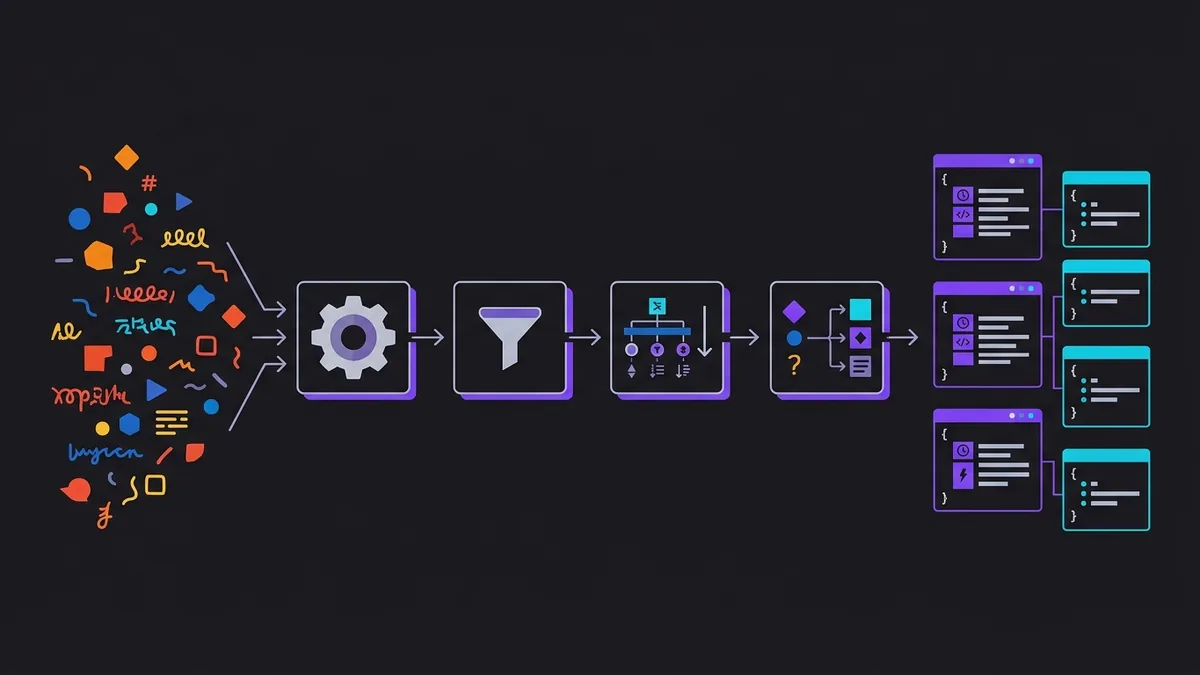
structlog takes a completely different architecture based on dictionaries and chained processors. Instead of constructing a rendered string at the call site, you pass key-value pairs. Every log event flows through a pipeline of pure functions that transform, enrich, and filter the dictionary until final output rendering.
Key advantages of using structlog:
- Type Consistency: Numeric values stay integers or floats and lists stay arrays in the rendered JSON, making numeric queries and aggregations effortless.
- Context Binding: You can bind persistent parameters to a logger instance at the start of a request and reuse it across all downstream functions.
- Thread and Coroutine Isolation: Native support for Python
contextvars, guaranteeing that an async request correlation ID never leaks into parallel executions. - Zero Overhead in Production: If your log level is set to
INFO,DEBUGcalls get dropped early in the pipeline before running expensive processing.
Step-by-step: how to configure structlog in Python from scratch
To start using the library in a fresh Python 3.14.7 environment, first install it using your package manager of choice:
pip install structlog
Configuring structlog involves defining the processor chain at your application's entry point (main.py or startup module). The structlog.configure() function accepts an ordered list of processors executed sequentially.
Here is a complete, working baseline implementation:
import logging
import sys
import structlog

def setup_logging() -> None:
    structlog.configure(
        processors=[
            structlog.contextvars.merge_contextvars,
            structlog.processors.add_log_level,
            structlog.processors.StackInfoRenderer(),
            structlog.dev.set_exc_info,
            structlog.processors.TimeStamper(fmt="iso", utc=True),
            structlog.processors.JSONRenderer(),
        ],
        wrapper_class=structlog.make_filtering_bound_logger(logging.INFO),
        context_class=dict,
        logger_factory=structlog.BytesLoggerFactory(),
        cache_logger_on_first_use=True,
    )

if __name__ == "__main__":
    setup_logging()
    logger = structlog.get_logger()
    logger.info("servico_iniciado", porta=8080, ambiente="producao")
Let's break down what each component in this chain does:
merge_contextvars: Extracts variables registered in the current async context and injects them into the event.add_log_level: Adds thelevelkey (such asinfo,error, orwarning) to the dictionary.TimeStamper: Appends an ISO-8601 timestamp formatted strictly in UTC.JSONRenderer: Serializes the final dictionary into a minified JSON string emitted to standard output (sys.stdout).
Running the script produces valid JSON output in your terminal:
{"ambiente": "producao", "event": "servico_iniciado", "level": "info", "porta": 8080, "timestamp": "2026-09-15T15:30:00.000000Z"}
How to integrate structlog with Python's standard logging module?
In real-world applications, you depend on third-party libraries like SQLAlchemy 2.0, FastAPI, Uvicorn, and HTTPX. These packages emit logs internally using Python's built-in logging module. If you only configure structlog, third-party logs will keep outputting as unformatted plain text, breaking log standardization.
The fix is routing all standard logging output through structlog's processor pipeline. We achieve this by attaching a custom Handler that bridges both systems.
Here is a breakdown of responsibilities in this integrated architecture:
| Component | Role in Integrated Pipeline |
|---|---|
| Standard Logging | Captures events from external dependencies (e.g., SQLAlchemy, Uvicorn) |
| ProcessorFormatter | Converts native LogRecord instances into structlog's internal dictionary |
| Structlog Processors | Applies timestamping, context, and JSON formatting to all events |
| Root Logger Handler | Outputs the consolidated result directly to standard output (stdout) |
Check out the bridge implementation in the code below:
import logging
import sys
import structlog

def configure_unified_logging(log_level: str = "INFO") -> None:
    shared_processors = [
        structlog.contextvars.merge_contextvars,
        structlog.stdlib.add_logger_name,
        structlog.stdlib.add_log_level,
        structlog.processors.TimeStamper(fmt="iso", utc=True),
        structlog.processors.StackInfoRenderer(),
    ]

    structlog.configure(
        processors=shared_processors + [
            structlog.stdlib.ProcessorFormatter.wrap_for_formatter,
        ],
        logger_factory=structlog.stdlib.LoggerFactory(),
        wrapper_class=structlog.stdlib.BoundLogger,
        cache_logger_on_first_use=True,
    )

    formatter = structlog.stdlib.ProcessorFormatter(
        foreign_pre_chain=shared_processors,
        processors=[
            structlog.stdlib.ProcessorFormatter.remove_processors_meta,
            structlog.processors.JSONRenderer(),
        ],
    )

    handler = logging.StreamHandler(sys.stdout)
    handler.setFormatter(formatter)

    root_logger = logging.getLogger()
    root_logger.handlers.clear()
    root_logger.addHandler(handler)
    root_logger.setLevel(log_level)

# Combined usage example
configure_unified_logging()

# Direct structlog emission
log = structlog.get_logger("app.pedidos")
log.info("processando_pagamento", valor=149.90, moeda="BRL")

# Captured standard library log
native_log = logging.getLogger("sqlalchemy.engine")
native_log.warning("conexao_lenta_detectada")
With this configuration in place, both your custom application logs and database warnings share the exact same JSON schema.
How to add context and request tracing to logs?
One of the biggest advantages of structured logging in web services is tracing a request's lifecycle across multiple methods and layer boundaries without manually passing context arguments everywhere.
structlog includes structlog.contextvars for thread-safe and coroutine-safe context management in asyncio applications.
Consider middleware in FastAPI or Starlette that extracts an X-Request-ID header or generates a unique UUID for each incoming request. We can bind that data to the context right at the entry point:
import asyncio
import uuid
import structlog

# Prior structlog setup omitted for brevity
logger = structlog.get_logger()

async def processar_item(item_id: str) -> None:
    # Automatically inherits request_id and user_id from context
    logger.info("validando_estoque", item_id=item_id)
    await asyncio.sleep(0.05)
    logger.info("item_reservado", item_id=item_id)

async def handle_request(user_id: str) -> None:
    # Clear residual context and bind variables to current coroutine
    structlog.contextvars.clear_contextvars()
    structlog.contextvars.bind_contextvars(
        request_id=str(uuid.uuid4()),
        user_id=user_id,
    )

    logger.info("requisicao_recebida")
    await processar_item("prod-982")
    logger.info("requisicao_finalizada")

if __name__ == "__main__":
    asyncio.run(handle_request(user_id="usr_5501"))
When running handle_request, every logger.info() call inside processar_item prints request_id and user_id inside its JSON payload without needing explicit arguments. End-to-end correlation like this is invaluable when debugging distributed systems.
How to format logs for local development and production?
While JSON is ideal for automated ingestion in cloud services, reading raw JSON blobs in your local terminal during development is tedious. A great engineering practice is toggling the renderer depending on where the app runs.
We can switch renderers based on an environment variable like ENVIRONMENT:
- In development (
development): Usestructlog.dev.ConsoleRenderer()for colorful, aligned, human-friendly log output. - In production (
production): Usestructlog.processors.JSONRenderer()for fast serialization and seamless log aggregator parsing.
Here is how to set up that conditional logic:
import os
import sys
import structlog

def get_processors(is_development: bool):
    base_processors = [
        structlog.contextvars.merge_contextvars,
        structlog.processors.add_log_level,
        structlog.processors.TimeStamper(fmt="%Y-%m-%d %H:%M:%S" if is_development else "iso"),
    ]

    if is_development:
        # Human-friendly local terminal rendering
        return base_processors + [
            structlog.dev.ConsoleRenderer(colors=True)
        ]
    else:
        # High-performance production JSON rendering
        return base_processors + [
            structlog.processors.StackInfoRenderer(),
            structlog.processors.format_exc_info,
            structlog.processors.JSONRenderer()
        ]

env = os.getenv("ENVIRONMENT", "development").lower()
is_dev = env == "development"

structlog.configure(
    processors=get_processors(is_development=is_dev),
    wrapper_class=structlog.make_filtering_bound_logger(20),
)

log = structlog.get_logger()
log.info("banco_dados_conectado", host="localhost", pool_size=10)
In development mode, instead of compact JSON string output, your terminal displays formatted, colorized text:
2026-09-15 15:30:00 [info ] banco_dados_conectado host=localhost pool_size=10

Conclusion
Mastering how to configure structlog in Python significantly levels up your backend software engineering standards. Moving away from arbitrary text outputs to structured JSON logging eliminates guesswork during post-mortems, cuts down your mean time to resolution (MTTR), and seamlessly integrates your services with modern observability ecosystems.
By unifying standard logging pipelines, leveraging contextvars for request tracing, and toggling renderers between dev and production, your team gains total visibility into application behavior without sacrificing performance or code clarity.